How we put a sitemap together
Sitemapping is a great opportunity to discover lost pages that haven’t been linked in ages, recognize opportunities for new content models, and enrich existing content with assets that were previously inaccessible.
When somebody hands us a website and asks for a better one, the first step to understanding what we’re actually dealing with tends to be an audit. And for a website audit, there are few tools more useful than a sitemap.
When rebuilding an existing site, we typically use sitemapping software such as octopus.do (though there are many alternatives) to create two different sitemaps:
- An existing sitemap documents what a client has now. This can usually be imported directly from their existing sitemap.xml file, but if their sitemap is missing or unfinished, we typically walk through the site and click around to gather a clear picture of what pages currently exist on their site.
- A proposed sitemap communicates the alternative that we’re recommending. This is usually created by duplicating the existing sitemap and rethinking how things are organized.
A brand new site only needs a proposed sitemap, and a straight migration only needs the existing sitemap. But when we’re talking about a website restructure or rebuild, it’s important to lay out both to clearly communicate the purpose and benefits of the work being done.
Start with what you have
Before committing to a grand plan for the new sitemap, check whether the site already publishes an XML sitemap at /sitemap.xml. Plenty do, and importing it can save you a lot of time.
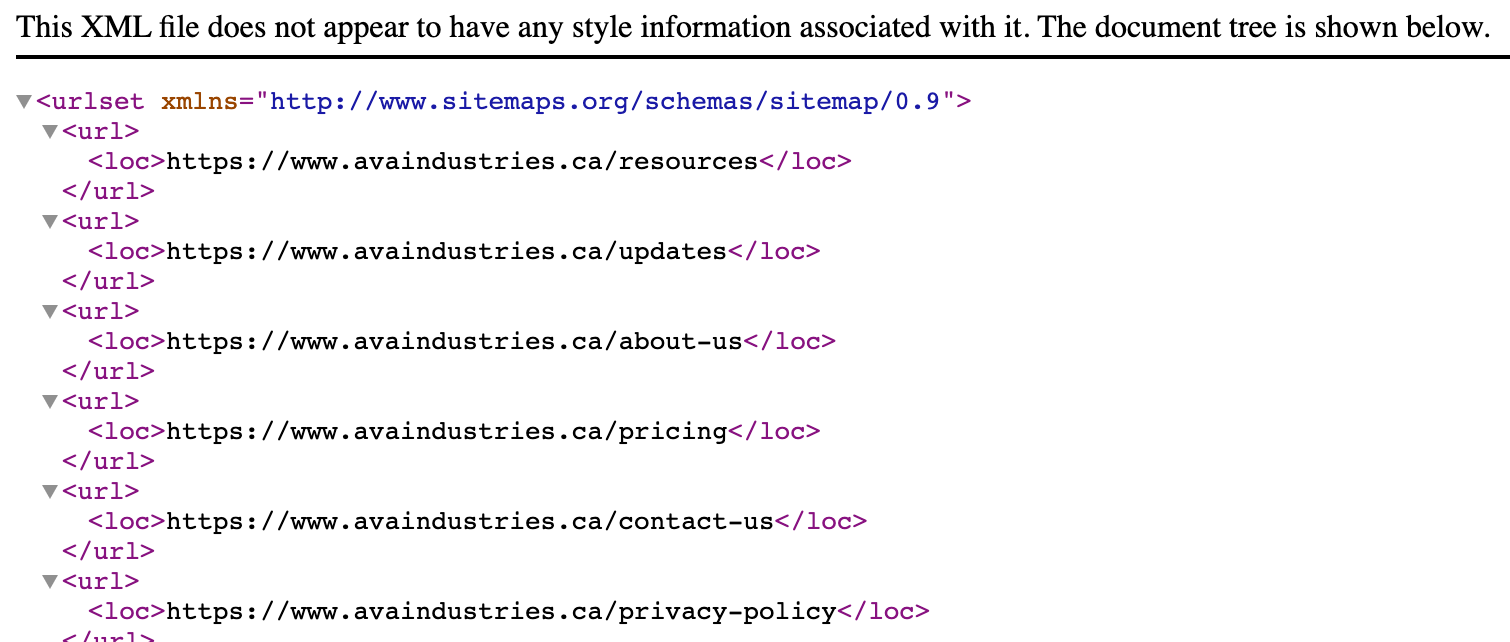
A sitemap isn’t always accurate, mind you. People sometimes forget to include a content type in their sitemap generation script, and we’ll often find lonely program pages or staff bios that have been forgotten by the site. That said, an unfinished sitemap is a better starting point than no sitemap at all. At least you’re starting with a list of pages that exist, or have existed, in some shape or form.
So after importing the sitemap (if it’s available), we take it a step further and extract the site manually, page by page into folders that mirror the site's own URL structure. Imagery is dropped into each page’s folder, with copy placed inside a document. Within that document we typically lay out the structure as if it’s being read by a screen reader: visuals marked by square brackets like [Hero], [Image], [Button] with the content around them. This is just how we do it, and your team might want to structure things differently based on your own personal preferences.
This can be a slow process, but it’s well worth it for a few reasons:
- It gives the design team a bank of copy and imagery to work from, and allows for a quick assessment as to whether the material is strong enough to support a page, or if it needs replacing.
- And it produces a bare structure stripped of the old site's design, allowing us to see what real content is actually there, and not just what the site ‘looks like’.
Assess the structure before planning next steps
Now that you’ve extracted the site’s structure, take a look at it. Does the structure of the site actually match the content, or is there a mismatch?
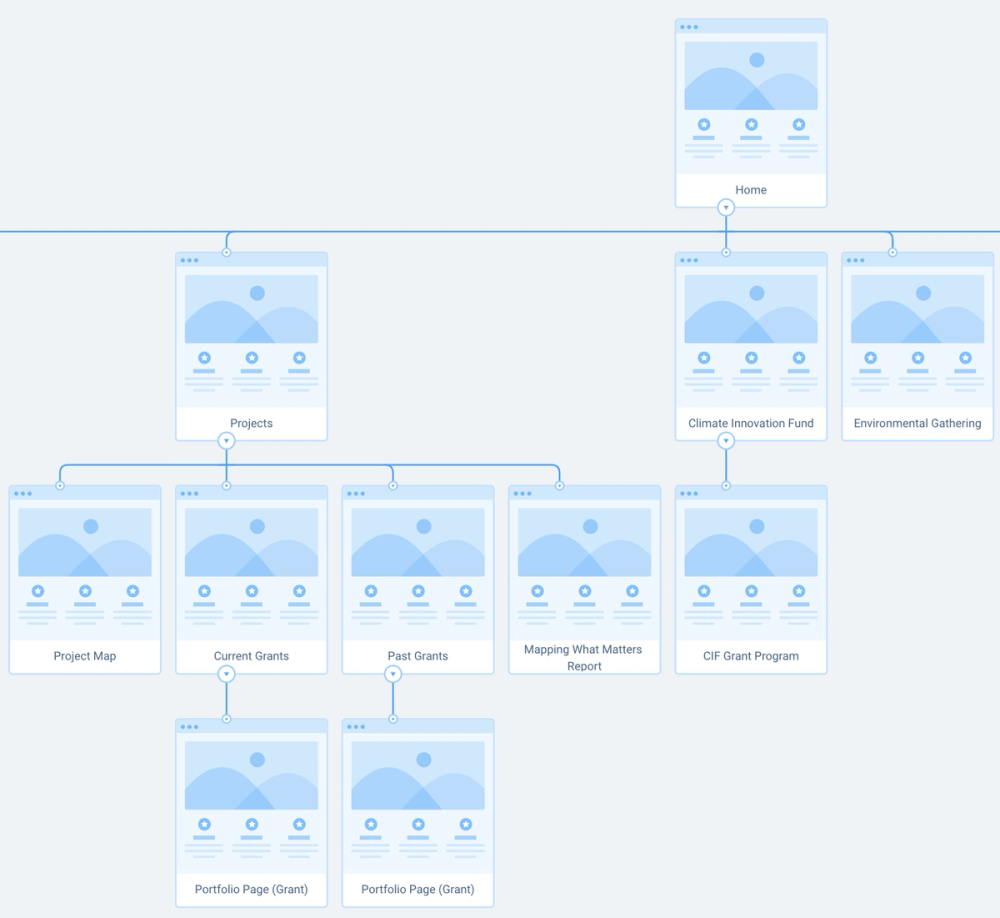
When you see repetition of three or more similar objects, consider if this is a good fit for a content model. For instance, if a client has three or more similarly-structured pages in the root directory, all called projects, it might be worth creating a Project content type and nesting this pages in a project folder (/projects/project-name).
Pattern-recognition is really important in sitemapping, just as it is in many programming contexts. Just as programmers don’t want to rewrite the same function fifty times to do the same task, and a carpenter doesn’t want to grab a different saw for every single cut, when we see repetition in a sitemap, it’s time to create a tool like a content model to make future pages of this ‘type’ easier to create and keep consistent. By creating a new tool for this purpose, the sitemap becomes organized, and creating new pages becomes easier for the people managing the CMS.
What if a page is too thin to justify its place in the sitemap? Typically, we’d then absorb the page’s content into its parent page, or a similar sibling page. For instance, if a website has pages called ‘About Us’ and ‘Our History’, but ‘Our History’ is a single photo and a short paragraph, we’d typically absorb it into ‘About Us’ as they’re thematically similar. Pages should each serve a specific purpose and contain rich, useful content, and a site with fewer pages but richer content is easier to navigate and maintain than a site loaded with thin pages. It’s also important to note that pages with rich, unique content are more-often indexed by search engines, so if you’re creating thin pages with one paragraph each in the hopes that ‘more pages means better search results’, you might want to rethink your approach.
Nested page structures only work when the nested items are surfaced somewhere, through a feed or a filter. Many sites we’ve audited have had entire wings inaccessible to the nav, because a parent page like ‘About’ had been deleted, and the nested pages never had a path back to the nav.
A few other tips before we continue:
- Keep page names short, so learn-about-us, where-we-started and contact-us become about, history and contact. Only increase complexity when the complexity helps to differentiate two similar things that need to remain separate.
- When sitemapping, show each page's URL next to its name, since seeing them together might help you notice that pages like /our-team, /about-us and /team-members might be worth consolidating.
- Represent repeatable page types once with a count, like Blog Post [210]. This keeps the map legible and also helps you surface potential nav and content migration considerations that you’ll need to deal with later.
Look beyond the current website
An organization's website usually doesn’t cover all the organization’s content, and sitemapping is a great time to look beyond the current content.
When kicking off a project like this, we like to ask our clients if they have any printed materials that currently don’t live online, like a brochure carrying a founding story, annual reports that live in a folder of PDFs on the CEO’s laptop, knowledge or frequently asked questions that live with a single staff member but haven’t been written down. We also look into internal forms that could be digitized to save time and materials.
Once you’ve created your proposed sitemap, consider if you’ve created a tidier version of the same website, or if you’ve actively enriched the content and structure in a meaningful way. It’s easy to create ‘just another website’, but it takes genuine attention and care to build something that enriches workflows and makes quality content easier to find.